10 Best Travel Photography Tips for Beginners (2026 Guide)
Travel photography is one of the most rewarding creative skills you can develop. The problem is most beginners come home with thousands of mediocre shots and a handful of good ones. These 10 tips will flip that ratio- giving you a systematic approach to capturing better travel photos from day one.
Table of Contents
Why most travel photos disappoint
The most common complaint from beginner travel photographers is this: the photos looked great on the camera screen, but when viewed on a laptop they feel flat, cluttered, or just unremarkable. This gap between expectation and result usually comes down to a small set of repeatable mistakes- not equipment.
You do not need an expensive camera to take compelling travel photos. A modern smartphone with deliberate technique will outperform a DSLR used thoughtlessly. The tips below focus on decisions you make before pressing the shutter- decisions that cost nothing and make the biggest difference.
Tip 1 - Learn the rule of thirds before anything else
The rule of thirds is the single fastest way to improve composition. Divide your frame into a 3x3 grid- most cameras and phones can display this overlay. Place your subject at one of the four intersection points, not dead center.
Center composition feels static. Off-center subjects create visual tension and guide the viewer's eye through the frame. When shooting landscapes, place the horizon on the top or bottom third rather than splitting the image exactly in half. This simple shift immediately makes photos feel more intentional.
Enable the grid overlay on your camera or phone before your next trip. You will use it constantly until the framing becomes instinctive. For a deeper dive into composition principles, Digital Photography School has an excellent breakdown of the rule of thirds with visual examples.
Tip 2 - Shoot during golden hour, always
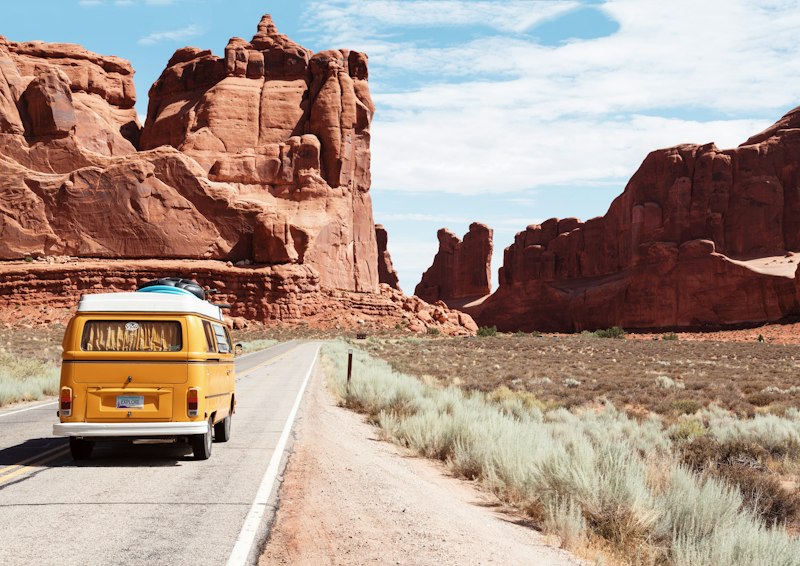
Golden hour- the 40 to 60 minutes after sunrise and before sunset - produces warm, directional light that flatters nearly every subject. Harsh midday sun creates deep shadows on faces, blown-out skies, and flat colors. The same location shot during golden hour looks completely different.
This is the single most impactful habit you can build. Plan your most important shots around sunrise and sunset. Use apps like PhotoPills or The Photographer's Ephemeris to find exact sunrise and sunset times at your destination. Use the midday hours for exploring, food, and rest.
Blue hour- the 20 minutes after sunset- is equally valuable for cityscapes and long exposures. The sky turns a deep, saturated blue that complements artificial light beautifully. Photography Life has an in-depth guide to shooting during golden and blue hour with practical examples.
Tip 3 - Look for leading lines
Leading lines are roads, paths, fences, rivers, staircases, or any linear element that draws the viewer's eye deeper into the image. They create depth and a sense of journey- both of which are central to travel photography.
When you arrive at a new location, scan the scene for natural lines before raising your camera. A cobblestone alley leading to a cathedral, a long bridge disappearing into fog, a mountain road curving into the distance- these are ready-made compositions. Position yourself so the line enters from one of the lower corners and moves toward your subject.
Tip 4 - Change your perspective
The eye-level, standing-straight shot is the default for most people- and it is why most travel photos look the same. Getting low, climbing higher, or shooting through a foreground element transforms a familiar subject into something fresh.
Get down to ground level for street markets, children, animals, or flowers. Find elevated viewpoints- a rooftop terrace, a hill, a bridge- for cityscapes and landscapes. Use doorways, arches, or foliage as natural frames around your main subject. Each perspective shift produces a fundamentally different photograph from the same scene.
Tip 5 - Include people for scale and story
Architecture and landscape photos gain immediate impact when a human figure is included. People provide scale- a tiny figure standing in front of an enormous temple communicates size far more effectively than the temple alone. They also add narrative: the viewer wonders who this person is and why they are there.
You do not need to ask strangers to pose. A distant figure walking away from camera, a local vendor at a market stall, or a travel companion looking into the distance all work. The person does not need to be the subject- they are an element that makes the composition more alive.
Tip 6 - Pack only the gear you will actually carry
The best camera is the one you have with you. This is not just a cliche- it is the central gear reality of travel photography. Heavy camera bags stay in hotels. The photographer who brings a mirrorless with a single versatile lens will outshoot the one who leaves their DSLR and three primes at the room.
For most travel situations, a practical kit looks like this:
- Body: A lightweight mirrorless or your smartphone
- Lens: A 24-70mm equivalent covers most travel situations
- Extra batteries: At least two- charging infrastructure is unpredictable
- Storage: Multiple small cards over one large card- a failed card should not ruin the entire trip
- ND filter: Useful for waterfalls and bright midday light
Leave the tripod unless your primary goal is long-exposure or astrophotography. A small GorillaPod fits any bag and covers most situations where you would otherwise need a full tripod.
Tip 7 - Shoot RAW for editing flexibility
RAW files preserve all the data captured by the sensor- they are unprocessed and uncompressed. JPEG files apply in-camera processing and discard the data that did not survive the compression. For travel photography, where you rarely control the light, that preserved data is essential.
With a RAW file, recovering a slightly overexposed sky or lifting shadow detail in a backlit portrait is straightforward in Lightroom or Capture One. The same adjustment on a JPEG often produces visible artifacts. If your camera supports RAW, enable it. You will use the extra latitude on almost every trip.
iPhone users shooting in ProRAW (available on iPhone 12 Pro and later) gain the same editing headroom. Check your Camera settings to enable it. Note that RAW files are significantly larger than JPEGs- budget for additional storage accordingly.
Tip 8 - Enable GPS tagging and use it deliberately
Every photo your smartphone takes can embed GPS coordinates in the EXIF metadata. This is not just a convenience feature- it is a long-term asset that transforms your photo archive into a geographic record of everywhere you have been.
On iPhone, go to Settings → Privacy & Security → Location Services → Camera and set it to While Using the App. On Android, open the Camera app, go to Settings, and enable Location tags. Once enabled, every photo will carry the precise coordinates of where it was taken.
With GPS-tagged photos, you can:
- Visualize your entire trip on an interactive map with SammaPix TravelMap
- Automatically sort photos by country or city using SammaPix GeoSort
- Recall exactly where a specific photo was taken years later
- Return to the same spot for a second attempt or a seasonal comparison
For DSLR and mirrorless cameras that lack built-in GPS, most manufacturers offer a Bluetooth companion app (Canon Camera Connect, Nikon SnapBridge, Sony Imaging Edge) that syncs GPS coordinates from your phone to the camera's EXIF data in real time. Use it.
One privacy note: GPS data travels with the image file when you share it. Before posting photos online, use the SammaPix EXIF Remover to strip location data from any image you share publicly. You can also view the full EXIF data of any photo- including lens, shutter speed, and aperture- with EXIF Viewer.
Tip 9 - Edit with restraint, not aggression
Heavy-handed editing- oversaturated colors, crushed blacks, HDR halos- dates a photograph instantly and telegraphs inexperience. The goal of post-processing travel photos should be to enhance what was already there, not to create something that did not exist.
A solid baseline edit for most travel photos involves: straighten the horizon, adjust exposure so highlights are not blown out, increase clarity slightly for texture, and set white balance to match the actual light conditions at the time. Everything beyond that is stylistic choice, not correction.
If you want a specific filmic look- the warm grain of Kodak Gold, the faded tones of expired slide film- apply it consistently across your series rather than varying the style image by image. Consistency is what makes a travel gallery feel cohesive. The SammaPix FilmLab tool lets you apply film emulation looks directly in your browser - no Lightroom required.
Tip 10 - Cull ruthlessly and share selectively
The hardest skill in photography is not taking a great shot- it is selecting the best shots from a thousand. Showing 50 photos from a trip to a friend dilutes the impact. Showing 10 carefully chosen images makes every one of them stronger.
Develop a culling workflow. After each day of shooting, do a first pass and delete anything clearly out of focus, poorly exposed, or redundant. Then do a second pass to pick the best from similar shots. A good rule of thumb: never share more than one photo from the same location and framing.
For photographers managing large libraries across multiple trips, tools like GeoSort help organize the volume so you can focus on the creative work of selection.
Building a complete travel photography workflow
These 10 tips work best as a connected system rather than individual tricks. Here is what a complete workflow looks like in practice:
- Before the trip: Research locations, identify golden hour times, plan your priority shots
- Gear check: Enable GPS tagging, charge batteries, format cards
- In the field: Apply composition principles consciously, vary perspective, prioritize golden hour
- End of day: Back up cards, do a rough cull on your laptop
- After the trip: Final cull, edit selected photos, organize by location using Sort by Location, build your travel map
- Before sharing: Strip GPS from photos you share publicly using the EXIF Remover
FAQ
What is the most important travel photography tip for beginners?
Shoot during golden hour. Light quality has more impact on a photo than any other variable under your control. A mediocre composition in beautiful golden light will almost always beat a perfect composition in harsh midday sun.
Do I need an expensive camera for travel photography?
No. Modern smartphones- particularly iPhone Pro models and flagship Android devices- produce excellent travel photos. The skills covered in this guide apply regardless of camera. Buy better glass before you buy a better body, and consider whether the additional weight of a dedicated camera is worth the benefit for your style of travel.
How do I find the GPS coordinates of where a photo was taken?
Use the SammaPix EXIF Viewer tool. Drop any photo in and it will display all EXIF metadata- including GPS coordinates, camera model, lens, aperture, shutter speed, and ISO. Everything runs in your browser with no uploads.
How many photos should I take at each location?
There is no fixed number, but a useful practice is to shoot until you have what you came for, then stop. Bracketing exposures and trying multiple compositions is good practice. Shooting 50 nearly identical frames of the same subject is not- it creates editing work without producing better results.
